Adding a handle to a smart lock can simplify installation while giving your front door convenient keyless access. The best options combine reliable hardware with the entry methods your household actually uses.
These 10 picks cover fingerprint readers, keypads, Wi-Fi app control, auto-locking, and rental-friendly access, with choices for different budgets and security needs.
Best 10 Smart Lock with Handle Picks for 2026
Best Hub-Free Upgrade
Philips Wi-Fi Smart Lock with Handle

- Fingerprint reader is integrated into the handle
- Built-in Wi-Fi requires no separate hub
- Supports up to 100 passcodes
Best For: Families and rental properties needing remote access and multiple entry methods
Best Traditional Keypad Pick
Kwikset SmartCode 917 with Halifax Handle

- Stores up to 30 user codes
- Includes Auto Lock and Passage modes
- Features SmartKey re-keying and BHMA AAA certification
Best For: Homes wanting reliable keypad entry without app or Wi-Fi controls
Best for Rentals
Sifely Fingerprint Smart Lock with Handle

- Offers five entry methods including fingerprint and fob
- Supports guest codes and access records
- Optional gateway enables remote and voice control
Best For: Airbnb hosts, families, and rental-property managers
Best for High-Volume Access

- Supports 250-plus user codes
- Includes scheduled, recurring, and one-time access
- Offers five entry methods and multiple security modes
Best For: Landlords, offices, hotels, and large households
Best Interior-Door Pick
- 0.3-second fingerprint unlocking
- Built-in Wi-Fi for remote control
- USB-C emergency power backup
Best For: Interior doors, offices, bedrooms, and storage areas
Best Access Flexibility
Yamiry Fingerprint Handle Lock

- Six unlocking methods
- Temporary codes and unlock records
- Reversible handle for either hand
Best For: Landlords, rentals, and multi-user households
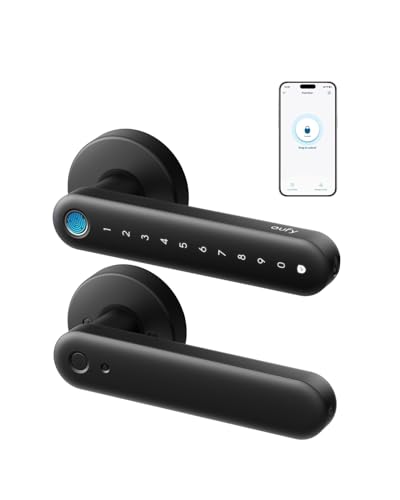
Best Keypad Option
eufy Smart Lock C33 with Handle

- Fingerprint and backlit keypad entry
- Built-in Wi-Fi with notifications
- Works on left- and right-hand doors
Best For: Front, side, garage, basement, and bedroom doors
Durable Lever Upgrade

- Six entry methods, including fingerprint and passcode
- Up to 50 fingerprints and 200+ passcodes
- Aluminum alloy with IP54 protection
Best For: Flexible keyless access without a separate deadbolt
Simple Keypad Value

- Quick screwdriver installation
- Up to 20 user codes plus one-time access
- Backlit keypad with physical-key backup
Best For: Basic keyless entry without app or fingerprint features
Connected Full-Set Choice

- Built-in 2.4GHz Wi-Fi with no hub required
- Fingerprint, app, PIN, and voice control
- Matching handle set included
Best For: Remote access and smart-home front-door upgrades
Best Hub-Free Upgrade – Philips Wi-Fi Smart Lock with Handle
The Philips Wi-Fi smart lock with handle combines fingerprint entry with a built-in touchscreen keypad and lever, making it a convenient choice when you want multiple ways to access a door. Its direct 2.4GHz Wi-Fi connection also supports remote management without a separate hub.
Best For: Families, rental properties, offices, and homeowners who want fingerprint access, remote control, and extensive PIN-code management.
Pros:
- Fingerprint sensor is built into the handle and unlocks in about 0.3 seconds.
- Supports fingerprint, app, password, voice, and physical-key entry.
- Built-in 2.4GHz Wi-Fi enables remote access, activity history, and scheduled or temporary codes without a hub.
- Stores up to 100 passcodes and offers auto-lock settings from 5 to 180 seconds.
Cons:
- Requires eight AA alkaline batteries, which are not included.
- Door compatibility requires a 2-1/8-inch hole, specific backsets, and at least 4.53 inches between the deadbolt and handle set.
This is a feature-rich smart lock with handle for buyers who value fast biometric entry and flexible access management. Check the door measurements carefully before ordering.
Best Traditional Keypad Pick – Kwikset SmartCode 917 with Halifax Handle
The Kwikset SmartCode 917 is a practical smart lock with handle for shoppers who prefer keypad entry over app-based controls. It pairs a contemporary Halifax lever with programmable access codes, configurable locking modes, and a physical-key backup.
Best For: Residential doors where dependable keypad access, re-keyable security, and straightforward operation matter more than Wi-Fi features.
Pros:
- Supports up to 30 user access codes, including optional one-time codes.
- Auto Lock, Passage, and Disable Passage modes accommodate different household or property-management needs.
- SmartKey Security lets you re-key the lock yourself.
- Reversible Halifax handle fits left- or right-hand doors, and the included 9V battery is rated for up to three years.
Cons:
- Control is through the touch keypad rather than an app or Wi-Fi connection.
- Door backset, cross bore, and thickness must be measured before installation.
Choose this model if you want a focused keypad solution with a handle and strong everyday convenience. Its BHMA AAA certification and SmartKey system add reassurance, but it is less suitable for remote-access workflows.
Best for Rentals – Sifely Fingerprint Smart Lock with Handle
The Sifely fingerprint smart lock with handle offers several keyless entry options, including fingerprint, keypad, app, fob, and key access. It is designed for straightforward DIY installation and can support remote management when paired with the optional Sifely WiFi Gateway.
Best For: Families, Airbnb hosts, and rental-property owners who need flexible guest access and entry records.
Pros:
- Provides fingerprint, keypad, app, fob, and physical-key unlocking.
- App or web tools can generate guest codes and review access records.
- Designed for DIY installation with no extra drilling on most standard doors.
- Reversible handle works with left- and right-handed doors.
Cons:
- Remote access and Alexa or Google Assistant support require the optional Sifely WiFi Gateway.
- Only a one-year product warranty is specified in the supplied details.
This smart lock with handle is especially appealing for access-heavy households and short-term rentals. Its gateway-dependent remote features should be included in your buying decision if off-site control is essential.
Best for High-Volume Access – Veise VE06-H Smart Handle Set
The Veise VE06-H is a smart lock with handle designed for homes, apartments, offices, and rentals. It combines app control, PIN codes, fobs, a mechanical key, and a thumb turn, while its management tools support a large number of users and scheduled access.
Best For: Property owners and households managing many recurring, temporary, or one-time users.
Pros:
- Offers five access methods: app, code, fob, mechanical key, and thumb turn.
- Supports more than 250 user codes, including one-time, permanent, scheduled, and recurring codes.
- Includes auto-lock, one-touch locking, privacy mode, passage mode, low-battery alerts, and an anti-peeping keypad.
- Includes fobs, backup keys, and a full handleset, with support for many standard doors from 1-3/8 to 2 inches thick.
Cons:
- Alexa and Google Home compatibility requires the separately sold Veise G2 gateway.
- The door must have three pre-drilled holes with compatible spacing, so measurements are important before purchase.
For landlords, offices, and busy households, the VE06-H stands out for its large code capacity and detailed access scheduling. Confirm the existing hole pattern and remember that gateway-based smart-home features add an extra purchase.
Best Interior-Door Pick – eufy FamiLock C32 with Handle
If you need a smart lock with handle for an interior door, the eufy Security FamiLock C32 combines fast fingerprint access with built-in Wi-Fi. Its 15-minute, screwdriver-only installation and automatic locking make it practical for bedrooms, offices, storage areas, and garage entries.
Best For: Interior doors where fingerprint access, remote management, and voice control are useful.
Pros:
- Unlocks with fingerprint recognition in about 0.3 seconds.
- Built-in 2.4 GHz Wi-Fi supports remote authorization and management.
- Works with Alexa and Google Assistant and includes auto-lock.
- Four AA batteries last over five months, with USB-C emergency backup.
Cons:
- Not recommended for front doors.
- Rekeying is not supported.
The C32 is a strong choice when convenient biometric entry matters more than traditional front-door compatibility. Its built-in Wi-Fi avoids the need for a separate gateway, while the interior-door focus keeps its best use case clear.
Best Access Flexibility – Yamiry Fingerprint Handle Lock
The Yamiry smart lock with handle offers six access methods, making it a flexible option for front doors and other standard American wooden doors. Fingerprint, app, passcode, key fob, mechanical-key, and optional gateway-enabled Alexa access give households and property managers several ways to enter.
Best For: Landlords, Airbnb hosts, and households that need multiple entry methods and app-based access management.
Pros:
- Supports fingerprint, Bluetooth app, passcode, key fob, and mechanical-key entry.
- App can create permanent or temporary access and record unlock activity.
- Reversible handle fits left- and right-handed doors.
- DIY installation takes about 10 minutes without additional drilling.
Cons:
- Remote control and Alexa voice unlocking require a separately sold Wi-Fi gateway.
- Its listed lock type is a deadbolt, so door compatibility should be checked before purchase.
For a smart lock with handle aimed at flexible access management, the Yamiry stands out for its broad unlocking choices and temporary-code support. It is particularly useful for rental properties, though remote features add the cost of a separate gateway.
Best Keypad Option – eufy Smart Lock C33 with Handle
The eufy Security Smart Lock C33 is a smart lock with handle designed for convenient keyless entry on front, side, garage, basement, and bedroom doors. It pairs fingerprint recognition with a backlit keypad, built-in Wi-Fi, app controls, and automatic locking.
Best For: Homes needing fingerprint and keypad access with remote notifications and event history.
Pros:
- Combines fingerprint recognition with passcode entry and a backlit keypad.
- Built-in Wi-Fi enables remote control, notifications, access management, and event history.
- Installs in about 15 minutes without drilling and supports left- or right-hand doors.
- Includes anti-peeping password functionality and auto-lock.
Cons:
- Uses eight AA batteries, which means more batteries than the four-AA C32.
- The supplied notes list the included components simply as the lock, so accessory details may need verification.
The C33 is a practical pick if you want both biometric and keypad entry in a single handle-equipped lock. Its Wi-Fi features are useful for monitoring access remotely, while the broad door-position compatibility supports several common home entry points.
Durable Lever Upgrade – DESLOC Smart Handle Lock
If you want a smart lock with handle that replaces a traditional lever without requiring a separate deadbolt, the DESLOC B200L-NEW offers several entry methods in a durable aluminum-alloy body. It suits front doors, garage entries, offices, and interior or exterior doors.
Best For: Homes, rentals, garages, and families needing fingerprint access plus flexible guest codes.
Pros:
- Six unlocking options include fingerprint, passcode, app, FOB, physical key, and shared eKey access.
- Stores up to 50 fingerprints and supports 200+ recurring, temporary, timed, or permanent passcodes.
- Aluminum-alloy construction, IP54 protection, backlit keypad, auto-lock, and a two-year warranty.
Cons:
- Wi-Fi notifications, remote updates, Alexa, and Google Assistant require the separately sold G2 Gateway.
- Bluetooth is the listed connectivity protocol, so remote control is not built in without the gateway.
The DESLOC is a strong choice when durability and multiple local entry methods matter more than built-in Wi-Fi. Its lever-style design also makes it a practical replacement for traditional handle locks.
Simple Keypad Value – Yamiry Keypad Door Knob Lock
The Yamiry YR04 is a straightforward smart lock with handle for shoppers who want keypad entry without app-based complexity. Its aluminum-alloy knob includes a backlit keypad, physical-key backup, and adjustable auto-lock timing.
Best For: Front doors and households seeking easy installation and basic code-based access.
Pros:
- Installs in less than 15 minutes with a screwdriver, according to the supplied product information.
- Supports up to 20 user codes plus a one-time guest code.
- Offers IP54 weather resistance, low-battery indication, anti-prying user codes, and 5- to 99-second auto-lock settings.
Cons:
- Its listed access options are keypad entry and physical key rather than fingerprint or app control.
- It provides fewer stored codes than the DESLOC and Philips models in this roundup.
Choose the Yamiry when you want a simple electronic door knob with useful essentials rather than a connected smart-home system. The included backup keys and flexible auto-lock setting add everyday practicality.
Connected Full-Set Choice – Philips WiFi Lock with Handle
The Philips 4200 Series is a smart lock with handle that combines a matching lever set, built-in 2.4GHz Wi-Fi, app control, voice compatibility, and fingerprint entry. It is designed for front-door upgrades where remote management and a complete hardware set are priorities.
Best For: Smart homes, rental properties, and users who want remote access, activity monitoring, and a matching handle set.
Pros:
- Built-in Wi-Fi requires no separate hub or bridge and supports remote locking, unlocking, status checks, and access history.
- Offers fingerprint entry, permanent, one-time, periodic, and recurring PIN codes, plus Alexa and Google Assistant compatibility.
- Includes a complete handle set and fits doors 1-3/8 to 1-3/4 inches thick.
Cons:
- Requires eight AA alkaline batteries, which are not included.
- Users must hold the reset button for five seconds to activate the lock.
- Compatibility should be checked against the stated door-thickness range before installation.
The Philips stands out for shoppers who want connected features without buying a separate gateway. Its included handle set and broad access-management options make it especially suitable for a full front-door upgrade.
How We Picked the Best Smart Lock with Handle
We focused on complete handle-and-lock systems rather than standalone smart deadbolts. Our comparison considered entry methods, remote connectivity, installation format, backup access, security features, and suitability for everyday residential or rental use.
Because product specifications can vary by version, confirm door thickness, backset, handing, battery type, and compatibility with your existing door before ordering. A lock that looks ideal on paper may not fit a particular door preparation.
Quick Comparison
- Best for app convenience: Choose a Wi-Fi-enabled model if you want remote lock status, temporary codes, or access management away from home.
- Best for fast daily entry: Fingerprint models avoid carrying keys or remembering codes.
- Best for guests and rentals: Keypad locks make it easier to issue and change codes without handing out physical keys.
- Best for simpler installations: Electronic handle sets with fewer connectivity requirements can be easier to configure and maintain.
Key Buying Factors for a Smart Lock with Handle
Entry Methods
Decide whether you need fingerprints, PIN codes, smartphone access, physical keys, or a combination. Multiple methods provide useful backup, but they can also increase setup complexity. A keypad is especially practical for children, guests, cleaners, and short-term rentals.
Wi-Fi, Bluetooth, and App Access
Built-in Wi-Fi supports remote control without an additional hub, while Bluetooth-based locks may require nearby phone access or a separate bridge for remote features. Check whether the app supports temporary codes, activity logs, user permissions, and notifications.
Door Fit and Installation
Measure the existing borehole, backset, door thickness, and clearance around the handle. Confirm whether the set is reversible for left- or right-handed doors. Some models replace a deadbolt and handle separately, while others use an integrated lever or knob design.
Power and Backup Access
Look for clear low-battery warnings and a dependable emergency option, such as a mechanical key, external power contact, or backup code. Auto-lock timing is convenient, but make sure it can be adjusted or disabled when needed.
Weather and Security Considerations
For an exterior-facing door, review weather-resistance information and protect the interior electronics from moisture. Prefer strong authentication, encrypted app connections, tamper alerts, and a manual locking mechanism where available.
Who Should Buy Which Smart Lock with Handle?
Choose a fingerprint-focused lock if household members want the fastest key-free entry. Choose a Wi-Fi model if remote monitoring and app-based access are priorities. Choose a keypad handle for flexible guest, family, or rental access. If you mainly want electronic convenience without recurring app management, a simpler keypad or code-based model may be the better fit.
Before buying, prioritize compatibility and the access method you will use most. The most feature-rich Smart Lock with Handle is not necessarily the best choice if it is difficult to install, lacks a reliable backup, or does not match your door.