Smart locks with fingerprint access make it easier to enter your home without carrying keys or remembering a code. They can also add useful controls such as app access, temporary passcodes, auto-locking, and activity monitoring.
This roundup compares 10 fingerprint-enabled locks for front doors, apartments, bedrooms, rentals, and family homes, with attention to installation, connectivity, access methods, and everyday convenience.
Best 10 Smart Locks with Fingerprint Picks for 2026
Fast, Connected Choice

- 0.5-second fingerprint unlocking with AI learning
- Built-in Wi-Fi and Wyze app remote control
- Eight-month battery rating with USB-C backup
Best For: Homeowners wanting fast biometric entry and remote management
Interior-Door Specialist
- 0.3-second fingerprint unlocking
- Built-in Wi-Fi with remote app management
- Designed for interior doors, not front doors
Best For: Bedrooms, offices, garages, and other interior spaces
Offline Access Value
TEEHO TE002 Fingerprint Deadbolt

- Fingerprint, passcode, one-time PIN, and key entry
- Up to 365 days of battery life
- IP54, BHMA Grade 3, and no network connection
Best For: Front or rental doors needing flexible offline access
Smart-Home All-Rounder

- Six unlocking methods, including fingerprint and Apple Watch
- Built-in Wi-Fi with no bridge required
- Eight-month battery rating and BHMA Grade 3 certification
Best For: Front doors needing flexible access and eufy integration
Best Overall
Tapo DL110 Fingerprint Smart Lock

- Six access methods, including fingerprint and Wi-Fi
- Stores up to 100 fingerprints
- Rechargeable battery lasts up to one year
Best For: Homeowners wanting flexible access and remote management
Best for Rentals
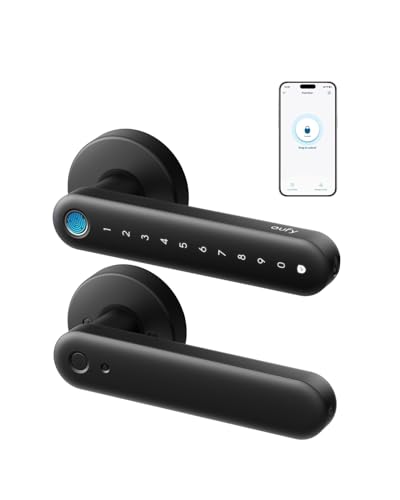
Fingerprint Smart Lock with Handle

- Five entry methods, including fingerprint and fob
- Guest codes and access logs support rentals
- Reversible handle supports left- and right-handed doors
Best For: Families, Airbnb hosts, and rental-property owners
Best Security Controls
Veise VE017 Fingerprint Smart Lock

- Fingerprint unlocking in under 0.2 seconds
- Encrypted local storage and detailed activity logs
- Multiple password types and access permissions
Best For: Multi-user properties needing detailed security management
Most Versatile
Yamiry Fingerprint Smart Door Handle Lock

- Six entry methods, including fingerprint and passcode
- App manages users, temporary codes, and unlock records
- DIY installation with a reversible handle
Best For: Landlords, rentals, and flexible household access
Best for Interior Privacy

- Fingerprint, app, and mechanical-key entry
- Passage, Normal, Privacy, and Silent modes
- Rechargeable USB-C battery with up to one-year life
Best For: Bedrooms and offices needing quiet privacy control
Fast, Connected Choice – Wyze Auto-Lock Bolt v2
For shoppers comparing smart locks with fingerprint access, the Wyze Auto-Lock Bolt v2 stands out with fast scanning, built-in Wi-Fi, and several backup entry methods. Its fingerprint reader unlocks in about 0.5 seconds, while the scratch- and smudge-resistant glass helps keep the scanner reliable and clean-looking.
Best For: Homeowners who want fingerprint entry plus remote control through built-in Wi-Fi.
Pros:
- AI-learning fingerprint scanner improves recognition over time.
- Built-in Wi-Fi supports remote lock management through the Wyze app.
- Offers fingerprint, app, code, and physical-key entry.
- Includes eight AA batteries rated for up to eight months, plus USB-C emergency power.
Cons:
- Its feature set may be more than needed for shoppers seeking a basic offline lock.
- The supplied information does not specify compatibility with every existing deadbolt setup.
The Wyze model is a strong all-around pick when speed, app access, and battery flexibility matter. Pairing it with a Wyze Video Doorbell also enables unlocking from the live video feed.
Interior-Door Specialist – eufy FamiLock C32
The eufy FamiLock C32 is a practical option for shoppers seeking smart locks with fingerprint access on interior doors. Its large fingerprint array is designed to unlock in 0.3 seconds, and built-in Wi-Fi supports remote authorization and management through the app.
Best For: Bedrooms, offices, storerooms, garages, and other interior-door applications.
Pros:
- Large-area fingerprint sensor offers 360-degree recognition and fast unlocking.
- Self-learning AI is designed to improve recognition for multiple users.
- Built-in 2.4 GHz Wi-Fi enables remote control without rushing home for visitors.
- Works with Alexa and Google Assistant and installs with a screwdriver in about 15 minutes.
Cons:
- It is not recommended for front-door use.
- Four AA batteries are rated for over five months, less than some listed alternatives.
- Rekeying is not supported.
Choose the C32 when you need convenient biometric access inside the home rather than a front-entry deadbolt. Its lever design, voice-assistant support, and built-in Wi-Fi fit rooms where remote access is useful.
Offline Access Value – TEEHO TE002 Fingerprint Deadbolt
The TEEHO TE002 is a useful choice for smart locks with fingerprint entry when you prefer a nonconnected deadbolt. It combines fingerprint access with passcodes, one-time PINs, physical keys, anti-peep code entry, and automatic locking for flexible everyday use.
Best For: Front, back, side, or rental doors where local access control is preferred over app connectivity.
Pros:
- Stores up to 20 fingerprints and 20 passcodes, plus one-time PINs.
- AI-powered recognition adapts over time and unlocks in about one second.
- Offers configurable auto-locking, one-touch locking, silent mode, and away mode.
- IP54 weather resistance, BHMA Grade 3 certification, and up to 365 days of battery life.
Cons:
- It has no Wi-Fi or app-based remote control.
- Four AA batteries are not included.
- Compatibility is limited to doors with 2-1/8-inch (54 mm) holes.
The TE002 makes the most sense for shoppers who want robust local access features without connecting a lock to a network. Its temporary PINs and vacation mode are especially practical for guests, rentals, and travel.
Smart-Home All-Rounder – eufy Security Smart Lock C220
The eufy Security Smart Lock C220 is a versatile pick among smart locks with fingerprint entry, offering six unlocking methods and built-in Wi-Fi without requiring a bridge. It combines quick fingerprint access with app, keypad, physical-key, Apple Watch, and voice-assistant control.
Best For: Front-door users who want multiple entry methods, remote access, and eufy ecosystem integration.
Pros:
- Fingerprint unlocking takes less than one second, with self-learning recognition.
- Supports six access methods, including fingerprint, app, keypad, key, Apple Watch, and voice.
- Built-in Wi-Fi enables remote control without an additional bridge.
- Offers an eight-month battery rating, BHMA Grade 3 certification, IP53 protection, and an unusual-attempt alarm.
Cons:
- Battery life may vary with how frequently the lock is used.
- Voice control requires a compatible Alexa or Google Assistant setup.
- Installation compatibility still depends on the existing deadbolt and bore configuration.
The C220 is a strong choice when convenience and ecosystem flexibility outweigh the need for a minimal lock. Its broad access-method lineup makes it easier to accommodate household members, guests, and backup situations.
Best Overall – Tapo DL110 Fingerprint Smart Lock
The Tapo DL110 is a versatile choice among smart locks with fingerprint access, combining fast biometric entry with Wi-Fi, Bluetooth, keypad, voice, and physical-key options. Its rechargeable battery and scheduled-access tools make it practical for everyday home use.
Best For: Homeowners who want multiple entry methods, remote management, and long battery life.
Pros:
- Recognizes fingerprints in approximately 0.42 seconds and stores up to 100 fingerprints.
- Offers six access methods, including fingerprint, passcode, Wi-Fi, Bluetooth, voice control, and backup keys.
- Removable rechargeable battery provides up to one year of operation.
- Supports resident profiles, one-time codes, and scheduled guest access.
Cons:
- Remote Wi-Fi management may be more than needed for buyers seeking a basic fingerprint lock.
- Its rectangular deadbolt design and installation components should be checked against the existing door setup.
With rapid fingerprint recognition and unusually broad access flexibility, the DL110 is a well-rounded option for households that want both biometric convenience and traditional backup methods.
Best for Rentals – Fingerprint Smart Lock with Handle
This fingerprint smart lock with a handle is designed for flexible household and rental-property access. It supports fingerprint, keypad, app, fob, and key entry, while optional gateway support adds remote management and voice-control compatibility.
Best For: Families, Airbnb hosts, and rental-property owners who want straightforward user and guest access management.
Pros:
- Provides five entry options: fingerprint, keypad, app, fob, and physical key.
- Supports guest-code generation and remote access logs for rental management.
- Designed for DIY installation without extra drilling on most standard doors.
- Reversible handle fits left- or right-handed doors.
Cons:
- Remote access and Alexa or Google Assistant control require the optional Sifely WiFi Gateway.
- The supplied notes do not specify fingerprint capacity, battery life, or recognition speed.
Its handle-style design and rental-focused access features make this a practical pick when family members or guests need different ways to enter, although gateway costs should be considered for full remote functionality.
Best Security Controls – Veise VE017 Fingerprint Smart Lock
The Veise VE017 stands out among smart locks with fingerprint access for detailed permissions, encrypted local data, and configurable alerts. Its app supports multiple user and password types, while the on-device fingerprint system is rated for recognition in under 0.2 seconds.
Best For: Multi-user homes and properties where detailed access permissions, logs, and privacy controls matter.
Pros:
- Self-learning fingerprint recognition is specified at under 0.2 seconds with 99.99% accuracy.
- Supports fingerprints, app access, codes, fob cards, mechanical keys, and optional voice control.
- Offers one-time, duration, permanent, and recurring password modes.
- Stores access data locally with AES-128 encryption and provides activity logs and alerts.
Cons:
- Alexa and Google Assistant compatibility requires the separate G1 Gateway.
- The supplied notes indicate at least 12 months of battery life but do not state the exact maximum runtime.
- The extensive controls may be more complex than necessary for simple household access.
For buyers prioritizing granular permissions and proactive security features, the VE017 offers a strong mix of fast fingerprint entry, local data protection, and remote user administration.
Most Versatile – Yamiry Fingerprint Smart Door Handle Lock
If you want smart locks with fingerprint access plus several backup options, the Yamiry YR01 offers fingerprint recognition, app control, passcodes, key fobs, mechanical keys, and optional Alexa or remote access through a separately sold Wi-Fi gateway. Its reversible handle and screwdriver installation make it a practical replacement for many standard American wooden doors.
Best For: Landlords, Airbnb hosts, and households that want flexible access methods and app-based access management.
Pros:
- Six access methods, including fingerprint, passcode, Bluetooth app, fob, key, and optional voice or remote control
- App supports temporary or permanent access, one-time codes, and unlock records
- Designed for DIY installation without additional drilling, with a reversible handle
Cons:
- Remote and Alexa features require a separately sold Wi-Fi gateway
- Compatibility is focused on standard American wooden front doors
The YR01 stands out among smart locks with fingerprint access for its broad combination of entry methods and management features. It is especially appealing when multiple users or rental properties need organized access control.
Best for Interior Privacy – K10B Fingerprint Door Knob
The K10B is a Bluetooth fingerprint door knob designed primarily for bedroom and office security. Along with fingerprint unlocking, it supports app access and a mechanical key, while Passage, Normal, Privacy, and Silent modes let you tailor how the interior door operates.
Best For: Bedrooms, offices, and other interior doors where privacy modes and quiet operation are useful.
Pros:
- Offers fingerprint, app, and mechanical-key entry
- Includes Passage, Normal, Privacy, and Silent modes
- Rechargeable battery is rated for up to one year and charges through USB-C
- App supports fingerprint setup, access records, and member management
Cons:
- App control works within Bluetooth range
- Remote control requires a separately purchased gateway
- Not suitable for doors with weather strips
For interior use, the K10B focuses less on broad smart-home integration and more on configurable privacy. Its rechargeable battery, silent mode, and multiple operating modes make it a sensible choice for bedrooms or offices.
Fastest Biometric Entry – Tuya Fingerprint Door Knob
This Tuya-compatible lock combines fingerprint recognition, keypad passcodes, NFC cards, mechanical keys, and app control in a reversible lever-style knob. The supplied notes cite approximately 0.5-second fingerprint unlocking, while remote or voice control requires a gateway that is not included.
Best For: Indoor wooden doors where quick biometric access, temporary codes, and automatic locking are priorities.
Pros:
- Supports fingerprint, keypad, NFC card, mechanical-key, and app entry
- App can create permanent or temporary access and track entry logs
- Auto-lock and silent-mode features add convenience and privacy
- Fits 1.18- to 1.97-inch wooden doors and installs without drilling or wiring
Cons:
- Remote and voice control require a gateway sold separately
- An administrator fingerprint must be registered before first use; otherwise any fingerprint can unlock the door
- The USB port provides emergency power but does not charge the internal batteries
The 190BT is a feature-rich option for shoppers who want smart locks with fingerprint access and several alternatives. Pay particular attention to the administrator setup and emergency-power limitations before installation.
How We Picked These Smart Locks with Fingerprint Access
We focused on locks that use fingerprint recognition as a primary entry method and assessed the features that matter after installation: keypad access, physical keys, mobile-app control, remote management, auto-locking, handle or knob design, and compatibility with common door setups. We also considered whether each option is better suited to a main entrance, interior room, rental property, or short-term guest access.
Because fingerprint performance depends on installation, battery condition, weather exposure, and the quality of the sensor, buyers should treat convenience features and door compatibility as equally important as the advertised biometric capability.
Quick Comparison
- Best for connected entry: Choose a model with Wi-Fi or app support if you want remote unlocking, notifications, or temporary codes.
- Best for simple keyless access: Keypad-and-fingerprint deadbolts are practical when you do not need extensive smart-home integration.
- Best for a complete handle replacement: Handle or knob models combine the fingerprint reader with the door hardware, but require closer attention to measurements.
- Best for rentals and guests: Look for passcode generation, multiple user profiles, and access logs.
Key Buying Factors for Smart Locks with Fingerprint
Door Compatibility and Installation
Confirm the door thickness, backset, bore-hole size, handing, and deadbolt or latch configuration before ordering. A deadbolt replacement is usually different from a complete lever or knob installation. Exterior doors may also require weather-resistant construction and a reliable seal around the hardware.
Connectivity and Remote Control
Bluetooth can handle nearby unlocking, while Wi-Fi enables remote control and notifications when paired correctly. Some locks require a separate hub or bridge. Check whether the app supports user management, temporary codes, access history, and low-battery alerts.
Fingerprint Capacity and Reliability
Compare how many fingerprints and users the lock can store. A responsive sensor should recognize clean, registered fingers consistently, but it should also provide dependable backup access through a keypad, app, or physical key. Avoid relying on biometrics as the only entry method.
Power, Security, and Convenience
Review battery type, expected runtime, emergency power options, and auto-lock settings. Features such as one-time codes, tamper alerts, privacy modes, and activity logs can be more valuable than a long list of app features.
Who Should Buy Which Smart Locks with Fingerprint?
Homeowners who want remote monitoring should prioritize connected models with app control and Wi-Fi support. Families may prefer a keypad and multiple fingerprint profiles so each person has a convenient entry method. Landlords and Airbnb hosts should look for temporary passcodes and access records rather than relying only on fingerprint enrollment. For a bedroom or apartment door, a simpler knob or handle lock may be sufficient and easier to manage.
Whichever model you choose, measure the door first, install it carefully, register more than one fingerprint per regular user, and keep the backup key or emergency power method accessible.