Smart plugs with overload protection make it easier to automate lamps, appliances, and office equipment while adding an important layer of electrical safety. The right model depends on whether you need a compact single outlet, a multi-outlet power strip, energy monitoring, or smart-home compatibility.
We compared ten options across connectivity, outlet control, protection features, load capacity, and everyday convenience so you can choose a safer fit for your home or workspace.
Best 10 Smart Plugs with Overload Protection Picks for 2026
Hub-Based Pick
Aqara Energy-Monitoring Smart Plug

- Energy monitoring with schedules and scenes
- Supports appliances up to 15A
- Repeats and strengthens Aqara Zigbee signals
Best For: Aqara smart-home users needing energy tracking and mesh coverage
Zigbee Multipack Pick
Innr Energy-Monitoring Smart Plugs

- Four-pack with detailed energy monitoring
- Resettable overload protection up to 15A
- Acts as a Zigbee router or repeater
Best For: Multi-room Zigbee systems using Hue, Home Assistant, or similar platforms
Charging-Station Pick

- Six AC outlets plus four USB charging ports
- 1080-joule surge and overload protection
- Flat plug and long cord for flexible placement
Best For: Dorms, desks, and nightstands needing high-capacity charging
Best Bluetooth/Wi-Fi Flexibility

- Bluetooth and 2.4 GHz Wi-Fi connectivity
- Alexa and Google Assistant support
- ETL/FCC certified; 10A/1200W rating
Best For: Households needing four compact, flexible smart plugs
Best Outlet Expansion

- Four individually controlled outlets
- 600-joule surge protection
- Alexa and Google Home compatible
Best For: Expanding one outlet for lamps and small appliances
Best Smart Power Strip

- Six individually controlled outlets
- Three USB ports, including USB-C
- 790-joule surge protection; Alexa only
Best For: Alexa users managing electronics and USB devices together
Best Surge-Protected Smart Strip
KMC 3-Outlet Smart Plug Power Strip

- Three independently controlled smart outlets
- 490-joule surge protection with ETL certification
- Alexa and Google Assistant support without a hub
Best For: Apartment users needing flexible outlet placement and individual device control
Best Overload-Protection Hub
GHome 9-in-1 Smart Power Strip

- Overload, overcurrent, and fuse protection
- Three individually controlled smart outlets
- Three USB ports plus three always-on outlets
Best For: Homes and offices managing many devices from one compact power strip
Best USB Smart Power Strip
Kasa KP303 3-Outlet Smart Strip
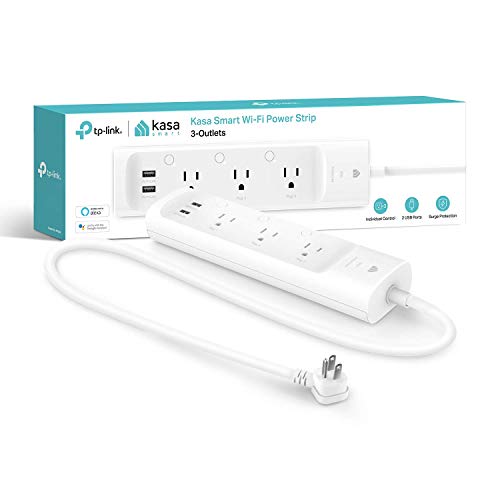
- Three independently controlled smart outlets
- Two always-on USB charging ports
- 750-joule ETL-certified surge protection
Best For: Smaller smart-home setups that also need USB charging
Hub-Based Pick – Aqara Energy-Monitoring Smart Plug
For households already using Aqara, this smart plug with overload protection combines remote control, scheduling, energy monitoring, and support for appliances drawing up to 15A. It requires an Aqara hub, so confirm compatibility before buying.
Best For: Aqara users who want energy tracking and a Zigbee mesh extender for higher-power appliances.
Pros:
- Monitors connected-appliance power consumption.
- Supports schedules, timers, scenes, and remote control through the Aqara Home app.
- Handles loads up to 15A and also functions as a Zigbee signal repeater.
- Compatible with Alexa, Google Assistant, and Apple HomeKit.
Cons:
- Aqara Hub is required and sold separately.
- Hub connectivity depends on a secured Wi-Fi network.
This is a strong choice when energy monitoring and Zigbee coverage matter as much as outlet control. Its hub requirement makes it less suitable for shoppers seeking a standalone Wi-Fi plug.
Wi-Fi Power-Strip Pick – LINKVOLT Smart Surge Protector
This LINKVOLT power strip suits shoppers looking for smart plugs with overload protection in a multi-outlet format. It offers independent control of three AC outlets, app and voice operation, scheduling, and 1080-joule surge protection without requiring a hub.
Best For: Home offices and desks that need individually controlled outlets plus surge and overload protection.
Pros:
- Controls each of the three AC outlets independently.
- Connects directly to 2.4GHz Wi-Fi with no hub required.
- Includes 1080-joule surge protection and overload protection.
- Provides timers, schedules, Away Mode, voice control, and a six-foot cord.
Cons:
- Only supports 2.4GHz Wi-Fi.
- Provides three AC outlets rather than individual control for USB ports.
With its compact layout and independently managed outlets, this model is practical for grouped desk or countertop devices. Choose it when direct Wi-Fi setup and surge protection are more important than energy monitoring.
Zigbee Multipack Pick – Innr Energy-Monitoring Smart Plugs
The Innr four-pack is designed for Zigbee households that want smart plugs with overload protection across multiple rooms. It adds detailed energy readings, remote control, scheduling, voice control, and Zigbee repeating, while supporting connected loads up to 15A.
Best For: Zigbee ecosystems needing several monitored outlets and improved mesh reliability.
Pros:
- Includes four plugs with calibrated energy monitoring for power, voltage, current, and accumulated energy.
- Works with Philips Hue Bridge, Home Assistant, Homey, Hubitat, SmartThings, and compatible Echo devices.
- Provides resettable overload protection and supports loads up to 15A.
- Each mains-powered plug can act as a Zigbee router or repeater.
Cons:
- Requires a compatible Zigbee hub or platform.
- HomeKit, Hue Sync, and Hue Secure are not supported.
This multipack offers particularly useful coverage for larger Zigbee installations, especially where energy visibility and mesh expansion are priorities. Check platform compatibility carefully if Philips Hue or Apple HomeKit features are important to you.
Charging-Station Pick – Mifaso 10-in-1 Power Strip
Although it is not a remotely controlled smart plug, this Mifaso power strip is a practical alternative for shoppers prioritizing physical overload protection and charging capacity. It combines six AC outlets, four USB ports, a 12-foot cord, and 1080-joule surge protection.
Best For: Dorm rooms, college spaces, desks, and nightstands requiring many charging connections.
Pros:
- Offers six widely spaced AC outlets and four USB ports, including two USB-C ports.
- Provides 1080-joule surge protection with an integrated circuit breaker.
- Includes protection against over-voltage, over-current, over-charge, short circuits, and overheating.
- Uses a flat plug and 12-foot extension cord for flexible placement.
Cons:
- Does not provide app, voice, scheduling, or remote smart control.
- The supplied notes list a 12-foot cord in the title and a 5-foot cord in the feature text, so verify the listing details.
This option is best viewed as a high-capacity protected power strip rather than a connected smart-home device. It makes sense when charging convenience and layered electrical protection matter more than automation.
Best Bluetooth/Wi-Fi Flexibility – Govee 4-Pack Smart Plugs
For shoppers comparing smart plugs with overload protection, the Govee 4-pack combines app-based control with Bluetooth or 2.4 GHz Wi-Fi connectivity. Its ETL and FCC certifications, 10A/1200W rating, scheduling, and compact design make it a practical choice for everyday household electronics.
Best For: Households that want multiple compact plugs with flexible Bluetooth or Wi-Fi control.
Pros:
- Bluetooth and Wi-Fi connectivity can provide a more flexible connection than Wi-Fi-only plugs.
- Works with Alexa and Google Assistant for voice control.
- Supports schedules, group control, and family sharing through the Govee Home app.
- ETL and FCC certified, with a compact design and four plugs included.
Cons:
- Supports 2.4 GHz Wi-Fi only and does not support 5G Wi-Fi.
- Rated for 10A and 1200W, so it is intended for appropriately rated household devices.
The Govee set is a strong fit when you need several individually usable smart plugs and value connection flexibility. Verify your devices stay within the stated power rating before purchase.
Best Outlet Expansion – Geeni 4-Outlet Smart Plug
This Geeni unit is a useful option among smart plugs with overload protection because it expands a standard outlet into four individually controlled outlets and includes 600-joule surge protection. It connects over 2.4 GHz Wi-Fi and supports schedules and voice commands through Alexa or Google Home.
Best For: Users who want four separately controlled outlets and built-in surge protection in one plug-in unit.
Pros:
- Provides four outlets with individual control from the Geeni app.
- Includes 600-joule surge protection and supports up to 15A.
- Works with Alexa and Google Home over 2.4 GHz Wi-Fi.
- Supports customizable schedules and simple app-based installation.
Cons:
- Requires a 2.4 GHz Wi-Fi connection.
- Supplied as a one-pack rather than a multi-pack.
Choose the Geeni when outlet density matters more than having several separate plug-in modules. Its individually controlled outlets and surge protection are especially convenient for lamps and other small appliances.
Best Smart Power Strip – Amazon Basics 6-Outlet Strip
For a desk, media center, or workspace, this Amazon Basics strip is a versatile pick among smart plugs with overload protection. It offers six individually controlled outlets, three USB ports, 790-joule surge protection, and Alexa-based scheduling without requiring a hub.
Best For: Alexa households managing several electronics and USB-powered devices from one power strip.
Pros:
- Six outlets can be controlled independently or grouped together.
- Includes two USB-A ports and one USB-C port.
- Provides 790-joule surge protection and supports up to 15A.
- Offers remote control, schedules, and routines through the Alexa app without a hub.
Cons:
- Works with Alexa only, rather than Alexa and Google Assistant.
- Requires 2.4 GHz Wi-Fi.
This strip is the most capable option for consolidating several devices in one location, particularly when USB charging is also useful. It is best suited to users already invested in Alexa.
Best Surge-Protected Smart Strip – KMC 3-Outlet Smart Plug Power Strip
If you need smart plugs with overload protection plus basic surge defense, the KMC 3-Outlet Smart Plug Power Strip combines three independently controlled outlets with 490 joules of surge protection. It works without a hub and supports Alexa and Google Assistant voice control.
Best For: Apartment users who want individually controlled outlets, a low-profile design, and a 4-foot extension cord.
Pros:
- Three outlets can be controlled independently from anywhere.
- Includes 490 joules of surge protection and ETL certification.
- Supports Alexa and Google Assistant without requiring a hub.
- Backed by US-based technical support and a lifetime warranty.
Cons:
- Provides three outlets, which may be limiting for larger setups.
- The supplied notes do not identify a dedicated overload-shutoff feature.
This is a practical choice when independent smart control and surge protection matter more than maximum outlet capacity. Its built-in cord also makes placement easier behind furniture.
Best Overload-Protection Hub – GHome 9-in-1 Smart Power Strip
For shoppers prioritizing smart plugs with overload protection, the GHome Smart Plug Outlet Extender offers three individually controlled Wi-Fi outlets alongside group-controlled USB ports and always-on outlets. Its listed safety features include overload, overcurrent, and fuse protection.
Best For: Home or office setups that need multiple outlet types, app scheduling, and broad device-management flexibility.
Pros:
- Combines three individually controlled smart outlets, three group-controlled USB ports, and three regular outlets.
- Includes overload, overcurrent, and fuse protection with an ETL- and FCC-certified design.
- Supports Alexa, Google Home, app, remote, and voice control.
- Offers timers, countdowns, recurring schedules, and random modes.
Cons:
- Works only with 2.4GHz Wi-Fi, not 5GHz.
- The USB ports provide group control rather than individual control.
- Its one-year warranty is shorter than some competing options.
The GHome stands out for safety features and outlet variety. Choose it when you want overload protection and extensive scheduling, provided your network supports 2.4GHz Wi-Fi.
Best USB Smart Power Strip – Kasa KP303 3-Outlet Smart Strip
The Kasa KP303 is a straightforward option for smart plugs with overload protection and surge defense, featuring three individually controlled smart outlets and two always-on USB ports. It also supports remote app control, schedules, and Alexa or Google Assistant voice commands.
Best For: Users who want a familiar smart-home power strip for controlling three devices while charging phones and accessories.
Pros:
- Three smart outlets can be controlled independently.
- Two always-on USB ports charge compatible accessories.
- Provides 750 joules of ETL-certified surge protection.
- Supports app control, schedules, timers, Alexa, and Google Assistant.
Cons:
- The USB ports are always on rather than individually smart-controlled.
- The supplied notes do not specify a dedicated overload-protection rating.
- It has fewer total connection options than the nine-outlet GHome model.
The KP303 is a balanced pick for a smaller smart-home setup. Its stronger listed surge rating and simple three-outlet layout make it convenient for lamps, entertainment devices, and everyday accessories.
How We Picked These Smart Plugs with Overload Protection
We focused on products that combine app-based or voice-controlled power management with protection features such as overload protection, surge protection, or certified electrical safeguards. We also considered the practical differences between single smart outlets, outlet extenders, and power strips with individually controlled receptacles.
Other factors included supported platforms, hub requirements, energy monitoring, USB charging, rated capacity, outlet spacing, and suitability for common household or home-office devices. Product descriptions and specifications can vary by region, so verify the electrical rating and protection details before purchase.
Quick Comparison
| Best For | Look For | Helpful Feature |
|---|---|---|
| One lamp or appliance | Compact single-outlet design | Voice and app scheduling |
| Energy-conscious households | Energy monitoring | Usage reports and tracking |
| Home offices | Multiple individually controlled outlets | Remote shutdown and schedules |
| Entertainment centers | Surge protection and sufficient spacing | Grouped device control |
| Travel or temporary setups | Simple Wi-Fi setup | No hub required |
Key Buying Factors for Smart Plugs with Overload Protection
Protection and Electrical Ratings
Check the maximum amperage and wattage before connecting heaters, kitchen appliances, tools, or other high-draw equipment. Overload protection helps limit unsafe loads, while surge protection is intended to reduce damage from voltage spikes; neither replaces a properly installed circuit breaker or a quality surge strategy for sensitive electronics.
Outlet Control and Capacity
Individually controlled outlets let you schedule devices separately, while a single-control strip turns several connected items on or off together. Count both AC outlets and USB ports, and confirm whether USB charging is independently controlled. Keep total connected load within the stated rating.
Connectivity and Ecosystem Support
Most Wi-Fi models use a 2.4GHz network and connect directly to an app, while Zigbee products may require a compatible hub. Confirm support for Alexa, Google Home, Philips Hue, or another platform you already use. A no-hub model is usually simpler, but a hub-based setup may provide stronger automation and local control.
Monitoring, Scheduling, and Installation
Energy monitoring is useful for identifying standby consumption and tracking appliance use, but accuracy varies. Look for timers, scenes, away modes, and clear setup instructions. Avoid placing smart plugs where moisture, heat, or blocked ventilation could create a hazard.
Who Should Buy Which Smart Plugs with Overload Protection?
Choose a compact single smart plug if you need straightforward control for one lamp, fan, or small appliance. Energy-monitoring models are a better fit for users who want consumption data or more informed scheduling. Zigbee options suit households already using a compatible hub or lighting ecosystem.
For desks, media centers, and shared charging areas, a power strip with individually controlled outlets offers more flexibility than several separate plugs. Choose a model with USB ports when you regularly charge phones or accessories, but do not treat USB availability as a substitute for adequate AC protection. For high-power appliances, verify the load rating carefully and use only equipment approved for smart-plug operation.